


When applying for civilian positions (BPS-6 to BPS-15) at the Ministry of Defence (GHQ), submitting your application fee correctly is the most vital step before finalizing your online form. Failing to provide accurate payment details or a valid receipt tracking number can lead to immediate rejection during the initial screening process.
To help you seamlessly complete your payment, the department offers two main methods: digital transfers or physical bank deposits. Below is the complete, easy-to-follow guide to paying your fee without any hassle.
Method 1: Paying via Mobile Wallets or Online Banking (IBFT)
If you prefer to avoid waiting in bank lines, you can instantly pay your fee using Easypaisa, JazzCash, or any Online Banking App through an Interbank Funds Transfer (IBFT).
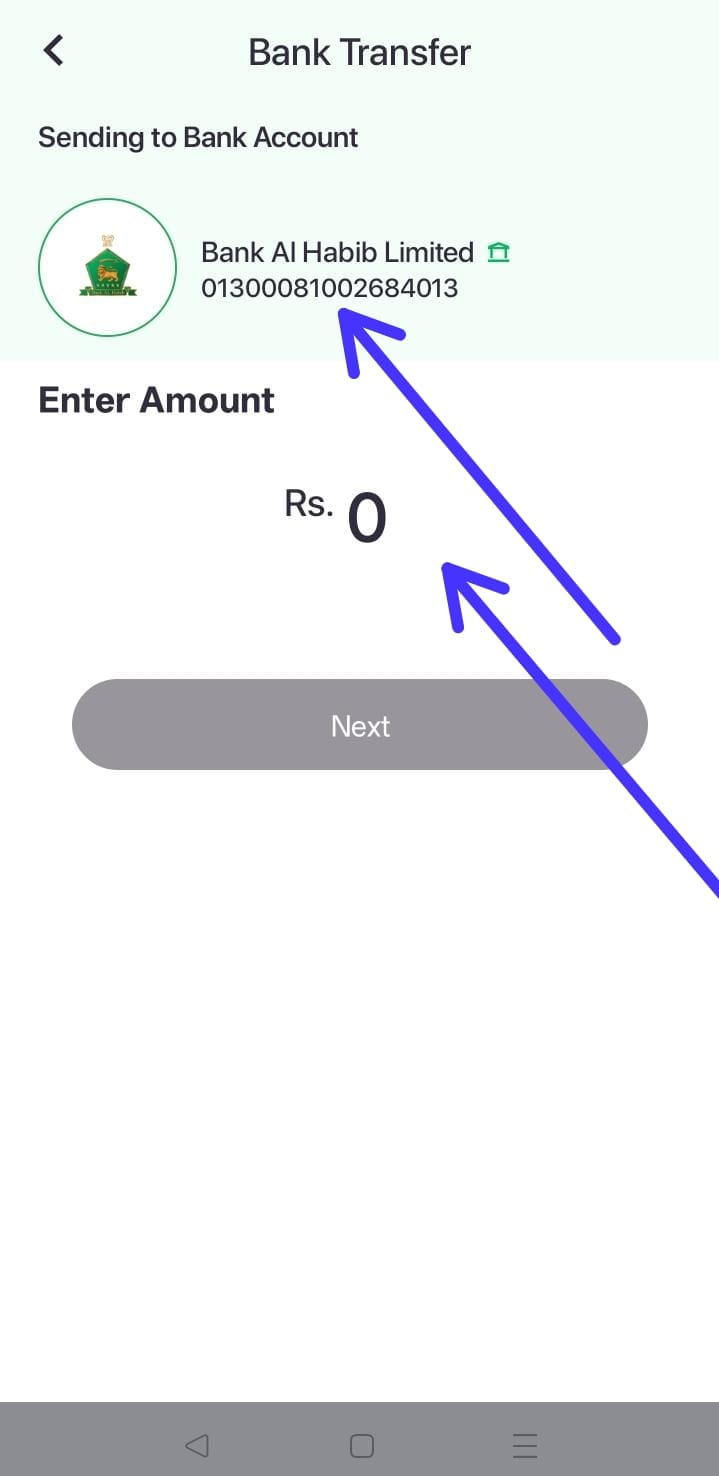
Official Account Details for Digital Transfer:
- Bank Name: Bank AL Habib Ltd
- Account Number:
0130-0081-002684-01-3 - IBAN Number:
PK66BAHL0130008100268401 - Account Title:
A&M Exam Fee Fund
Critical Steps for Digital Applicants:
- Verify the Title: Before hitting the final “Confirm” or “Pay” button on your mobile wallet or banking app, make sure the screen displays the exact account title: A&M Exam Fee Fund.
- Note the Transaction ID: Once the payment is successful, copy down the unique digital Transaction ID (TID). You will need to enter this tracking number manually on your online application form.
- Save Your Screenshot: Take a clear screenshot of the successful transaction receipt. Keep it safe on your phone or computer, as you will need to upload it directly to the job portal during submission.
Method 2: Paying via Physical Cash Deposit at Bank AL Habib
If you prefer traditional cash payments, you can visit any branch of Bank AL Habib Limited across Pakistan that provides online deposit facilities. You must request a designated Cash Deposit Slip from the counter.
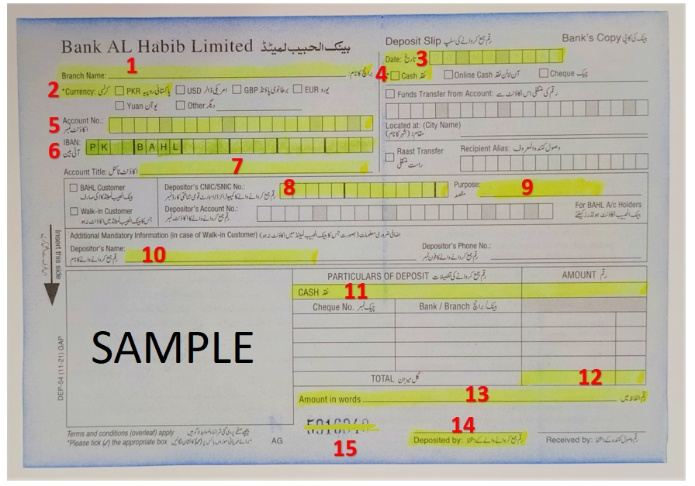
Using the official sample slip provided by the department, follow this exact layout to fill out the form cleanly:
Step-by-Step Slip Filling Instructions:
- Branch Name (1): Write
GHQ Branch. - Currency (2): Mark or tick the PKR box.
- Date (3): Write the current date of your visit.
- Payment Type (4): Mark or tick the Cash box.
- Account Number (5): Enter
0130-0081-002684-01-3. - IBAN (6): Enter
PK66BAHL0130008100268401. - Account Title (7): Write
A&M Exam Fee Fund. - Depositor’s CNIC (8): Carefully write down your own 13-digit CNIC Number.
- Purpose (9): Write the exact Name of the Post you are applying for (e.g., LDC, Assistant, etc.).
- Depositor’s Name (10): Write your full legal name as it appears on your CNIC.
- Particulars of Deposit (11): Enter your specific fee amount in the CASH column (Rs. 250 for BPS 6-10 or Rs. 350 for BPS 11-15).
- Total (12): Write the total fee amount clearly in figures.
- Amount in Words (13): Write the fee amount out in words (e.g., Two Hundred and Fifty Rupees Only).
- Deposited By (14): Sign your official signature here.
- Deposit Slip / Challan Number (15): Locate the pre-printed, unique numbers at the bottom of the slip. This is your Challan Number, which you must type into your online form during application submission.
⚠️ Important Reminder: Make sure the bank teller returns the stamped candidate/customer copy of the physical deposit slip to you. Keep this Original Fee Deposit Slip / Challan safe, as security teams will verify it physically before letting you enter the screening test or interview venue.
No. If you are applying for positions between BPS-6 and BPS-15, you must deposit the fee prior to submitting your application online. The portal requires you to enter your payment transaction details before you can finalize your submission.
The fee structure is divided as follows:
- BPS-1 to BPS-5: Completely Fee Exempted (No fee required).
- BPS-6 to BPS-10: Rs. 250.
- BPS-11 to BPS-15: Rs. 350.
No. Traditional payment methods such as manual Bank Drafts, Postal Orders, or direct physical cash handovers to the department will NOT be accepted. You must strictly use the designated Bank AL Habib digital account details or fill out the official online cash deposit slip at a Bank AL Habib branch.
For digital Interbank Funds Transfers (IBFT), use the following details:
- Bank Name: Bank AL Habib Ltd
- Account Number:
0130-0081-002684-01-3 - IBAN Number:
PK66BAHL0130008100268401 - Account Title:
A&M Exam Fee Fund
Important: Always verify that the account title shows A&M Exam Fee Fund before authorizing the payment.
For Digital/Online Payments: You need to note down and enter the unique Transaction ID (TID) and upload a clear screenshot of the payment confirmation.
For Bank Deposit Slips: You need to enter the unique pre-printed Deposit Slip / Challan Number located at the bottom of the slip.
No. DO NOT send your application printout, physical fee receipt, or any other documents (like pictures, CNIC, or marksheets) via courier or post. The entire initial process is paperless.